
Your market, in focus
Charts, sample assets, and a place to start.
 POKZEN / BINOMO
Start with your setup and follow each step through the Binomo workspace. This local demo uses virtual funds and sample signals; it does not connect to a Binomo account.
Practice at your pace. Your limits stay in view.
 Pokzen
Charts, sample assets, and a place to start.
Review session limits before you begin.
Follow the signal through to your activity.
Your workflow
Move from your first setup to your next review, with Binomo at the center of your workspace.
Select an asset from the watchlist or asset picker, then review its chart and trade settings.
Choose a strategy preset and set the trade amount and session limits in one panel.
Start a demo session, follow the signal status, and open Deals to inspect the resulting activity.
Inside BinoPokzen
A focused app for the way you practice. Explore the screens, then step into your own demo session.
The selected market, amount, and duration stay close to the chart, ready to review before a session.
The strategy panel brings three presets, the trade amount, and both session limits into one view.
Move between active and closed deals, then open an individual entry for its timing and result.
Open the web app or download the Android preview to explore BinoPokzen.
Before you explore
Get to know the BinoPokzen workspace and what you can do in the demo.
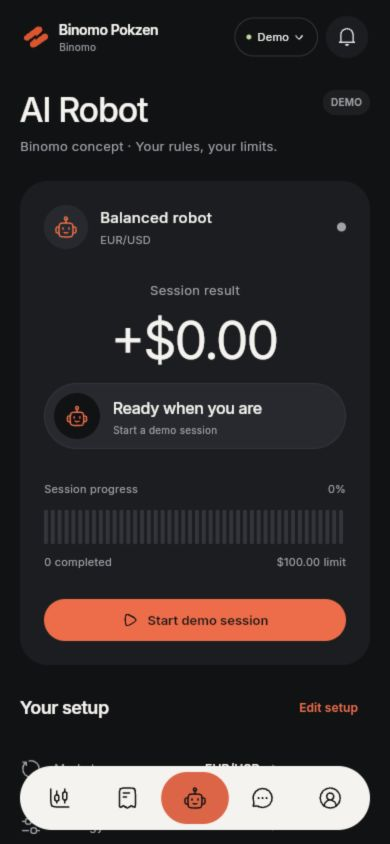
Open the demo and choose a market in Trading. In AI Robot, review the strategy and limits, then select Start demo session.
You can choose an asset, trade amount, duration, and strategy preset. The robot setup also includes session profit and loss limits.
No. The presets let you explore the setup interface. Sample directions and outcomes follow a preset local sequence, so they do not measure a strategy’s performance.
AI Robot shows the current status, completed trade count, session result, and activity log. Deals holds active and closed entries with individual detail views.
No. This is a local demo with virtual funds. It does not connect a broker account, place real trades, collect payment details, or transfer money.
A clearer next step
Start with a setup. Explore at your own pace.